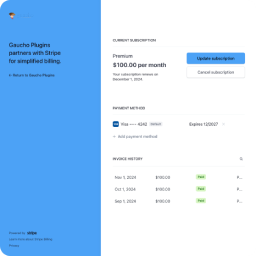
Welcome
Login for Stripe Customer Portal is a WordPress plugin that adds a branded magic-link login page on your site, so Stripe customers can self-serve subscriptions, invoices, and payment methods in Stripe’s hosted Billing Portal — without you building any account UI.
What Login for Stripe Customer Portal does#
Login for Stripe Customer Portal sits between your WordPress site and Stripe’s hosted Customer Portal. Customers visit a dedicated URL on your domain (default /customer-portal/) or a page embedding the [login-stripe-customer-portal] shortcode, enter their email, and receive a one-time login link. Clicking the link opens a Stripe Billing Portal session against your Stripe account — no WordPress user accounts, no passwords, no payment data stored on your site.
The login page lives on your WordPress site so it inherits your domain, branding, and SSL. Every billing surface — subscriptions, invoices, payment methods, plan changes — stays inside Stripe’s hosted UI, configured under Settings → Billing → Customer portal in your Stripe Dashboard.
Free on WordPress.org. The plugin is fully functional with the free release on WordPress.org — there is no PRO tier or paywalled feature. It supports an unlimited number of customers and Stripe accounts on a single site.
Key features#
- Stripe API integration — Connect your Stripe account with a Secret API key. The plugin uses Stripe’s hosted Billing Portal sessions; no card data ever touches your site.
- Custom login endpoint — Dedicated front-end URL such as
yoursite.com/customer-portal/, with a configurable slug (max 64 chars). - Shortcode embed — Drop
[login-stripe-customer-portal]on any page, post, or widget area to embed the same login form inline. - Magic-link authentication — 20-character one-time tokens, valid for one hour, stored as SHA-256 hashes at rest (1.0.6+).
- Mode-aware customer gating — Optionally restrict login to emails that already exist as Stripe customers, or auto-create new Stripe customers on first redemption.
- Configurable return URL — Send customers back to a URL on your site after they exit Stripe’s portal.
- Rate limiter — 5 requests per 10 minutes, per email and per IP, so the magic-link form can’t be abused as a mail relay or enumeration oracle (1.0.6+).
- WP-CLI surface —
wp lscp purge-tokens,wp lscp limiter-reset <email>,wp lscp send <email>,wp lscp config(1.0.6+). - GDPR Privacy Tools integration — Personal-data exporter and eraser wired into Tools → Export Personal Data / Erase Personal Data (1.0.6+).
- Clean uninstall — Removing the plugin clears every option and transient, including your Stripe Secret key (1.0.6+).
How it works#
- Customer visits your login page or a page with the shortcode and submits their email address.
- The plugin verifies the form nonce, applies the rate limiter, and (if existing-only mode is on) looks up the customer in Stripe.
- A random 20-character token is generated; its SHA-256 hash is stored in a 1-hour transient mapped to the email; a magic link is sent via
wp_mail(). - Customer clicks the link within the hour. The plugin re-hashes the URL token, deletes the transient (one-time use), and resolves or creates the Stripe customer.
- A Stripe Billing Portal session opens against your account and the browser is redirected to Stripe’s hosted portal.
- When the customer exits the portal, Stripe returns them to your configured Return URL.
Get started#
The fastest path is Quick Setup — install the plugin, paste your Stripe Secret key, save permalinks, and test with a real email. If you haven’t enabled Stripe’s Customer Portal yet, start with Stripe Prerequisites. For a complete walkthrough of every admin field, see Settings Reference.
Quick Setup› Installation› Stripe Prerequisites› Settings Reference›Need help? Open a ticket at gauchoplugins.com/support (typically answered within one business day) or post on the WordPress.org support forum. For known issues and fixes, see the Troubleshooting guide.